


When finance teams start evaluating invoice automation, one of the first comparisons they make is OCR vs AI. The question sounds simple, but it often hides a bigger issue: what exactly needs to improve in the AP process? Is the main problem manual data entry, poor invoice accuracy, too many exceptions, or slow approvals after capture?
That is why OCR vs AI should not be treated as a technology debate alone. It is a process question. OCR helps read the invoice. AI helps understand it and make the next steps more reliable. For teams trying to reduce manual work in accounts payable, that distinction matters.
OCR vs AI: what each technology actually does
To understand OCR vs AI properly, it helps to separate the roles clearly.
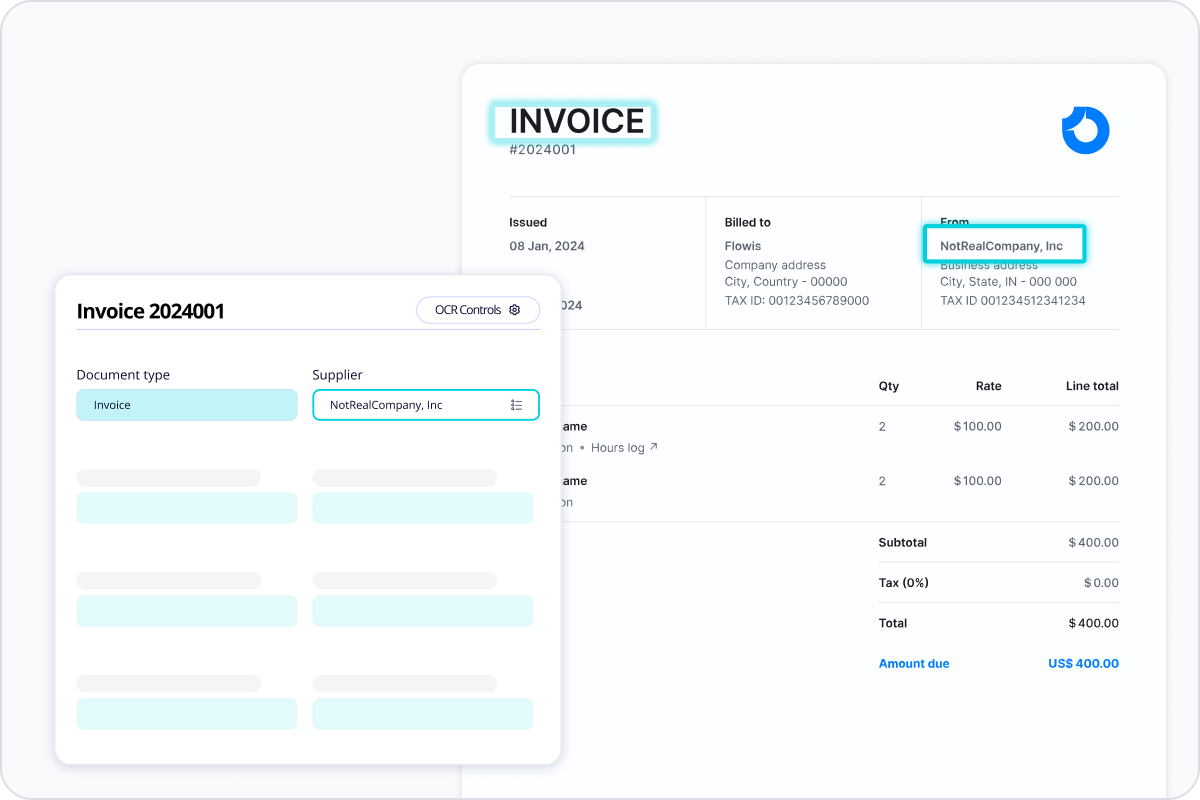
OCR, or optical character recognition, converts text from scanned invoices, PDFs, and images into machine-readable data. In practice, that means pulling out values such as supplier name, invoice number, due date, VAT, and total amount.
AI works at a different level. It helps interpret the invoice structure, recognize patterns across different layouts, support validation, and improve how the data moves into the workflow. In other words, OCR captures the text, while AI helps turn that captured data into something more useful for finance operations.
This is why teams comparing OCR vs AI often realize they are not choosing one instead of the other. They are deciding how advanced they need invoice automation to be after the document is read.
When OCR solves the main problem
For some AP teams, OCR is already a strong step forward. If invoices are still processed manually and employees spend too much time retyping data into the ERP or accounting system, OCR can deliver immediate value.
OCR is especially useful when:
- invoice formats are relatively consistent
- the main issue is manual entry
- invoice volume is moderate
- manual checks are still manageable
- the business is early in its automation journey
In these situations, OCR reduces repetitive work and creates a cleaner digital intake process. It is often the right starting point because it deals with the most visible bottleneck first.
This also explains why OCR is still a core element of modern accounts payable automation. It addresses the first layer of the problem: getting invoice data into the process faster.
Why OCR vs AI becomes a real question later
As invoice processes grow more complex, finance teams start asking a more practical question: if OCR reads the invoice, why are we still fixing so much by hand?
That is where the OCR vs AI comparison becomes more relevant. OCR can extract text, but it does not always understand whether the values make sense in a business context. It will not reliably know whether:
- the format changed compared to previous supplier invoices
- a value looks suspicious
- a document is likely a duplicate
- a key field is missing
- the data is ready for approval or posting
- the invoice should follow a certain approval route
At this point, the business is no longer dealing with a reading problem only. It is dealing with a validation and workflow problem.
How AI improves invoice processing
In the OCR vs AI discussion, AI becomes important when the goal is not just faster capture, but more reliable invoice handling across the full process.
AI can improve invoice processing by helping to:
- recognize supplier documents even when layouts differ
- identify fields using context, not only position
- improve extraction quality over time
- support line-item recognition
- detect anomalies and possible duplicates
- reduce the number of invoices that need manual correction
For finance teams, this matters because the workload in AP usually does not end at capture. A large part of the effort often sits in reviewing errors, resolving exceptions, checking missing fields, and preparing invoices for approval.
That is where OCR scanning technology becomes more valuable when combined with AI capabilities rather than treated as a standalone reading tool.
OCR vs AI in real finance operations
The most useful way to think about OCR vs AI is this:
OCR reads the invoice.
AI helps interpret the invoice.
Workflow automation decides what happens next.
That distinction matters because many companies improve capture but leave the rest of the AP process too manual. Invoices may be scanned successfully, but employees still correct data, chase approvals, and re-enter approved values into the ERP.
When teams ask whether AI is necessary, what they are often really asking is whether they need better capture only or better process performance overall.
If the answer is better process performance, then OCR vs AI should be viewed through the lens of validation, exception handling, approval routing, and system integration.
When AI becomes the better fit
AI usually becomes the stronger option in the OCR vs AI comparison when:
- invoices come from many suppliers in different formats
- line-item validation matters
- duplicate detection is important
- invoice volumes are growing
- the business wants fewer exceptions
- approval speed depends on cleaner data
- AP must scale without adding headcount
In these scenarios, AI helps reduce the amount of work that remains after OCR. It does not eliminate business rules or human oversight, but it reduces friction and makes automation more dependable.
This is also the point where businesses often start moving toward touchless invoice processing, where standard invoices can flow through the process with limited manual intervention.
Why ERP integration still matters in OCR vs AI
Another reason the OCR vs AI comparison can be misleading is that neither technology solves the whole AP process on its own. Even if extraction and interpretation are strong, the workflow still has to connect to the ERP and to approval logic.
Finance teams should ask:
- how are invoices validated before approval?
- how are exceptions routed?
- how is invoice status tracked?
- how do approved invoices move into the ERP?
- how is auditability maintained across the process?
These questions matter because good automation depends on what happens after the invoice is read. That is why ERP integration is a critical part of the discussion. Without it, even strong capture can leave AP teams with too many manual handoffs.
What finance teams should evaluate before deciding
The best way to approach OCR vs AI is not to ask which one is more advanced. The better question is which level of automation the business actually needs.
A useful evaluation should include:
- how much manual correction still happens after capture
- how often supplier formats vary
- whether line items matter
- how often duplicates or exceptions occur
- how dependent approvals are on accurate extracted data
- whether approved invoices flow cleanly into the ERP
That gives a far more practical answer than comparing labels alone. In some organizations, OCR is enough for now. In others, AI is what makes invoice automation reliable enough to deliver measurable gains.
Conclusion
OCR vs AI is not really about choosing between two competing technologies. It is about understanding what part of the invoice process needs to improve.
OCR is essential for reading invoice data. AI becomes valuable when the business needs better interpretation, stronger validation, fewer exceptions, and a smoother path from capture to approval and ERP posting. For finance teams, the right choice depends less on the label and more on the complexity of the process they are trying to improve.
Teams that want to look beyond document capture should also consider how invoice processing fits into broader business process automation and where structured approaches like digital invoicing can reduce dependence on document reading altogether.